Services / Face blurring
Blur every face in your footage, automatically and at scale.
- Redaction
- Irreversible, pixel-level
- Detection
- Bounding box + confidence
- Review
- 100% human sign-off
- Scales with
- GPU, not headcount
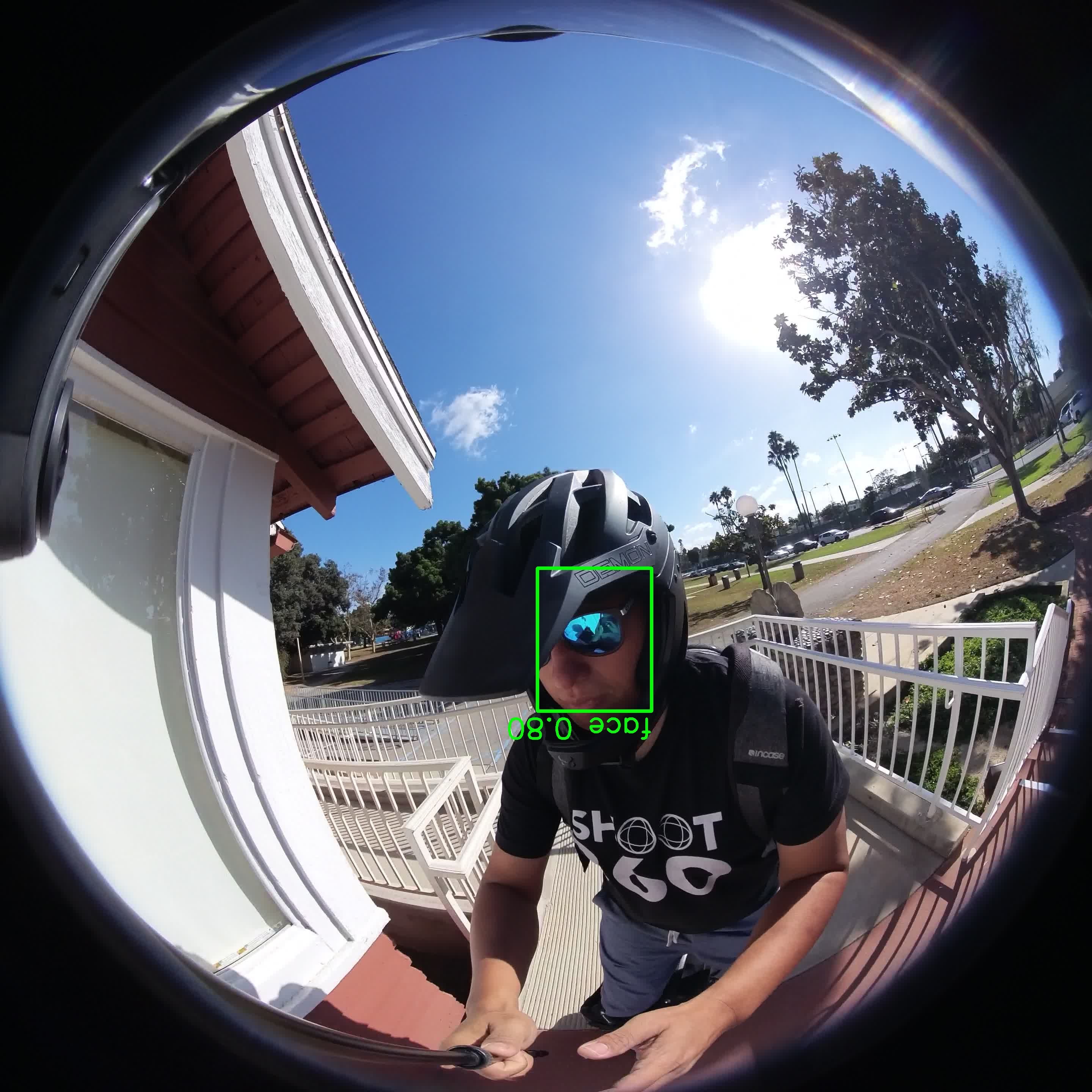 face · 0.80
A real frame at both stages. Detect returns the bounding box and confidence; Blur bakes the redaction into the delivered pixels.
What it is
Face blurring, defined.
Face blurring is the automatic detection and irreversible obscuring of human faces in images or video, so that individuals can no longer be identified. A model locates each face with a bounding box, then a blur or pixelation is baked into the output pixels rather than applied as a removable overlay.
What it covers
The cases a naive pass misses.
Recall is decided by the hard detections, not the easy ones — profiles, reflections, small and moving subjects. Those are what the tracking and the human review exist for.
At scale
Built to run continuously, not one file at a time.
Throughput scales with the GPU you allocate, so the pass keeps up with a standing feed instead of a person watching clips.
- Volume
- From a single clip to continuous batches of hundreds of hours. Throughput scales with GPU allocation, not with headcount.
- Recall target
- Set the acceptable miss rate in the spec. We tune the detector threshold and review depth to hit it, and report the achieved recall on a labelled sample.
- Resolution & rate
- SD through 4K and above, any frame rate. Blur strength scales with face size so small faces are still fully obscured.
- Turnaround
- Batch jobs quoted with a delivery date up front; standing pipelines run continuously as you upload.
- Formats in
- Common video containers and codecs, image sets, and frame sequences. Tell us what your cameras produce.
How it works
Detect, track, redact, review, certify.
Detection returns a box and a confidence per region; tracking keeps it covered across frames; the blur is irreversible; a human signs off; and the certificate records it per file.
- 1 · Detect
- A vision model runs on every frame, returning a bounding box and a confidence score for each face, head, licence plate, and legible screen or document it finds.
- 2 · Track
- Boxes are linked across frames into stable tracks, so a subject that turns away, blurs in motion, or leaves and re-enters is covered for the entire time they are on screen — not just the frames they face the camera.
- 3 · Redact
- Each tracked region is irreversibly blurred into the pixel data of the output. There is no separate mask layer, no metadata toggle, and no key that restores the original region.
- 4 · Review
- A human reviewer scrubs the output and confirms no un-consented person or identifier survives in any frame. If a region is uncertain, the clip is held or dropped rather than shipped.
- 5 · Certify
- The detector version, pass timestamp, reviewer ID, and per-file settings are recorded against the clip, so the anonymization claim is checkable per file rather than asserted in a brochure.
See the detection-to-blur pipeline in full on the automatic anonymization page, and the step-by-step method in how to blur faces in video automatically.
What you get back
The output, plus proof it was done.
- Output
- The anonymized video or images in the format you sent, plus an optional sidecar of per-frame detection boxes and confidences.
- Certificate
- A per-file record: detector version, pass timestamp, reviewer ID, blur settings, and the recall measured on the sample.
- Source handling
- We return only the anonymized output and delete the source, or return both and retain nothing — your call, in writing.
- Review
- Human confirmation on 100% of clips by default; sampled review for very high-volume standing pipelines by agreement.
The guarantees
Irreversible, fails closed, auditable.
Automatic blurring is common. These are the commitments that make the result something your counsel can rely on.
- Irreversible by construction
- Blur is baked into the delivered pixels. No un-redacted master is shipped alongside, and there is no reversible mask or key.
- Fails closed
- When a reviewer is unsure a region is fully covered, the clip is held or discarded — never downgraded and shipped to hit a deadline.
- Consented subjects preserved
- Anyone who signed a release — your operator, your talent — can stay in frame. The pass targets un-consented third parties, not your usable signal.
- Auditable per file
- Every output carries the detector version, timestamp, reviewer sign-off, and redaction settings, so a batch can be spot-checked against its own record.
- You keep the source, or we destroy it
- Your choice, in writing: we return only the anonymized output and securely delete the source, or return both to you and retain nothing.
Where teams use it
Common jobs this service is sent.
- Publishing dashcam, bodycam, or egocentric footage without exposing bystanders
- Preparing customer or patient video for research, analytics, or model training
- De-identifying CCTV and retail footage before sharing with vendors
- Clearing user-generated video for public release
- Blurring faces in training data so the usable signal — hands, objects, scene — stays intact
FAQ
Face blurring — questions teams ask first.
- How do you blur faces in a video automatically?
- A face-detection model runs on every frame and returns a bounding box with a confidence score for each face. Those boxes are linked into tracks across frames so a face stays covered even when it turns away or blurs in motion, and each tracked region is then blurred directly into the output pixels. A human reviewer confirms nothing was missed before the file is released.
- Is the blur reversible?
- No. The blur is written into the pixel data of the delivered file. There is no separate mask layer, no metadata switch, and no key that reconstructs the original face. If you also want the un-blurred source destroyed, we do that and record it.
- What about faces the detector misses?
- That is what the recall target and the human review are for. You set the acceptable miss rate; we tune the detection threshold and review depth to meet it, measure the achieved recall on a labelled sample, and a reviewer catches the residual before delivery. When a frame is genuinely ambiguous, it is held or dropped rather than shipped.
- Can you blur faces at large scale?
- Yes — that is the point of running it as a service. Throughput scales with GPU allocation rather than with people, so a standing pipeline can process continuous batches of hundreds of hours. We quote a delivery date for one-off batches and run continuously for ongoing feeds.
- Will blurring faces ruin my footage for analytics or training?
- For most computer-vision tasks the signal lives in the scene, the objects, and the motion — not in bystander faces — so blurring faces leaves the usable data intact. If your task genuinely needs faces, that becomes an explicitly consented capture rather than an anonymization exemption.
Send a sample for face blurring.
We anonymize a sample, you confirm the classes and recall meet your bar, and then we run the rest to spec with a delivery date. Standing feeds run continuously.