The smallest on-disk option
LeRobot stores episodes as parquet metadata plus one mp4 per camera, which is the most compact of the delivery formats on this site because video stays compressed rather than stored as raw frames.
Delivery format
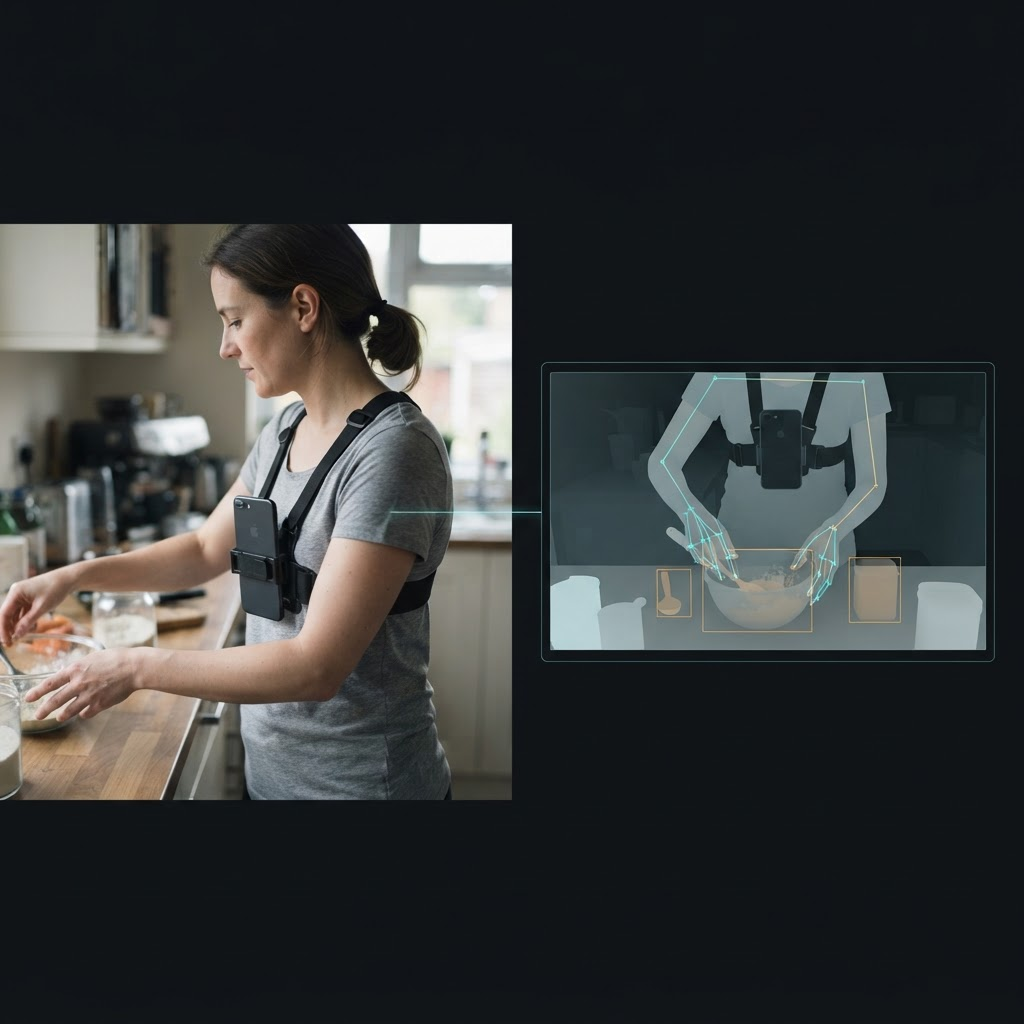
What a LeRobot delivery includes
LeRobot stores episodes as parquet metadata plus one mp4 per camera, which is the most compact of the delivery formats on this site because video stays compressed rather than stored as raw frames.
Hand joints and body pose are flattened into a single observation.state vector: 2×21×3 hand joints first, then 24×3 body joints, in that order.
The v2.1 layout loads with lerobot.common.datasets.lerobot_dataset.LeRobotDataset with no conversion step, because the export already matches what that loader expects.
A custom collection captures and annotates each episode once; LeRobot, RLDS, WebDataset, and HDF5/zarr are different exports of that same underlying episode, not separately captured datasets.
Definition
A custom LeRobot dataset is a first-person (egocentric) video collection, specified by a buyer and captured against that written spec, delivered in the dataset layout the LeRobot ecosystem uses for imitation learning: parquet files holding metadata and state alongside one mp4 file per camera, arranged in the Hugging Face datasets layout.
This page describes ordering a custom collection with LeRobot as the delivery format. It is not a reference page for the LeRobot format itself — for the full field mapping, loading snippet, and gotchas, see the LeRobot format page.
Why LeRobot
LeRobot is the format the LeRobot library and its surrounding imitation-learning tooling expect, so a dataset delivered in that layout loads directly with lerobot.common.datasets without a conversion step. It is also the smallest on-disk option among the formats on this site, because episodes are stored as compressed mp4 rather than raw frame arrays.
Ordering a custom collection rather than relying on an existing public LeRobot-format dataset means the tasks, environments, and camera tiers in the capture match what a specific policy is missing, instead of training on whatever tasks a public dataset happened to cover. A team building on the LeRobot stack for imitation learning can specify the exact skills, objects, and settings their current policy fails on, and receive a dataset shaped to close that gap rather than re-purposing footage collected for a different problem.
This also matters for teams standardizing their training pipeline around a single loader. If an existing pipeline already consumes LeRobot-format datasets, a custom collection delivered in that same layout slots in without the engineering cost of writing or maintaining a second loader for a one-off custom source.
Fields
A LeRobot delivery on this site includes observation.images.head and observation.images.wrist_l / observation.images.wrist_r as per-camera video streams, an observation.state vector, and an action field. The container is parquet plus one mp4 per camera, and timestamps are per-frame, aligned to the head-camera clock.
The observation.state vector packs the 2×21×3 hand joints first, then the 24×3 body joints — keep that ordering when slicing it. Depth is not embedded in the mp4 video; if a policy consumes depth, it is pulled from the HDF5 export of the same episodes instead.
Episode structure
Every delivery format on this site, including LeRobot, is a projection of the same canonical episode schema: four groups per episode — meta, streams, annotations, and calibration — with explicit dtypes, shapes, and metric units. Action segments in the annotations group record a start and end timestamp with a verb and noun for each labeled action.
In the LeRobot export specifically, that structure is flattened into the features a LeRobot-based training loop expects: observation.images.*, observation.state, and action per frame, rather than the nested streams/ and annotations/ groups used in the HDF5/zarr export. The meta.json fields that travel with every episode on this site — episode_id, skill_id, site_id, participant_id, duration_ns, license, and reject_flags — are preserved in the LeRobot delivery’s metadata, so a specific LeRobot episode can still be traced back to the skill, site, and batch it came from.
Because every format is a projection of the same schema rather than a separately captured dataset, a reject_flags check applied before delivery holds across formats: an episode excluded from a batch for failing QA does not show up in the LeRobot export any more than it would in the RLDS or HDF5 export of the same batch.
Other formats
Yes. A custom egocentric collection is captured and annotated once, and the same episodes can be exported into more than one delivery format: RLDS (TFDS-compatible tfrecord shards), LeRobot (parquet + mp4), WebDataset (tar shards for streaming), HDF5 & zarr (one group per episode, the format the site’s own QA tooling reads), or Rerun .rrd for visual inspection before writing a loader.
Choosing LeRobot as the delivery format does not require giving up access to the other layouts if a spec calls for more than one export of the same episodes. A team evaluating formats before committing can request a RLDS or HDF5/zarr export of the same Spec Pilot batch alongside the LeRobot export, to compare loading speed and disk footprint on their own training pipeline before scaling the order.
Loading
A LeRobot delivery loads with lerobot.common.datasets.lerobot_dataset.LeRobotDataset, which returns per-frame samples: observation.images.head as a decoded video frame, observation.state as the flattened hand-and-body pose vector, and action as the recorded action for that frame. Because the video is stored as mp4, decoding is the bottleneck in most training loops, so the loader’s built-in video backend should be used for frame access rather than decoding the mp4 files independently per item.
The observation.state vector packs hand joints before body joints, so code that slices into it rather than consuming the whole vector needs to preserve that ordering. Depth is intentionally not embedded in the mp4 stream; a policy that needs depth alongside the LeRobot features reads it from the HDF5/zarr export of the same episodes rather than from the LeRobot delivery itself.
Episode boundaries in the parquet metadata mark where one demonstration ends and the next begins, which matters for any training setup that samples contiguous sub-sequences rather than single frames — a dataloader that ignores those boundaries risks stitching the end of one task attempt to the start of an unrelated one. Reading the parquet index before writing a custom sampler avoids that failure mode on a first integration.
Pipeline
Capture, camera calibration, cross-stream sync verification, and per-batch QA happen once, against the canonical episode schema, before any format-specific export is produced. The LeRobot export inherits that same calibrated, synced, QA-passed episode data — it is a different on-disk layout of the same underlying capture, not a separately verified pipeline.
Because of that, the calibration and sync guarantees documented for the episode schema and the other delivery formats apply equally to the LeRobot export: the head-camera frame is the identity for all extrinsics, and streams are stored at native rate rather than resampled during export.
This single-pipeline approach is also why requesting a second format for the same batch, such as RLDS alongside LeRobot, does not mean re-capturing or re-verifying anything: the two deliveries are built from the same QA-passed episodes, just packaged into two different on-disk layouts, so a format comparison can be run without doubling the cost or timeline of the underlying collection.
License and provenance
A custom collection ships under the licence terms stated on this site’s provenance and terms pages: a perpetual, irrevocable, worldwide grant that is non-exclusive by default, with the buyer owning the resulting dataset. Every contributor signs a documented release before capture, and that consent chain is recorded as part of the batch’s provenance.
These licence and provenance terms apply to the underlying egocentric capture regardless of which delivery format — LeRobot, RLDS, or otherwise — the episodes are exported into.
Getting started
Start with a written spec describing the tasks, environments, objects, and camera tier your model needs, and specify LeRobot as the delivery format. Most orders begin with a Spec Pilot — a small, fast first batch that proves the spec and accept criteria hold up on real footage before scaling to the full order.
Where coverage for the requested tasks and regions is already deep, the median time from signed spec to first validated batch is 48 hours. Where it is thin, turnaround runs three to four weeks while recruiting expands in parallel across more regions.
At a glance
Every collection runs through the same seven-stage end-to-end custom collection pipeline. End-to-end custom data collection is a managed service that takes an AI data need from problem to owned dataset in a single accountable pipeline.
LeRobot fields
| Field / stream | What it contains | Documented on |
|---|---|---|
| observation.images.head | Head-camera video frame, decoded from the per-camera mp4 | /formats/lerobot |
| observation.images.wrist_l / wrist_r | Wrist-camera video frames, one mp4 per camera | /formats/lerobot |
| observation.state | Flattened hand joints (2×21×3), then body joints (24×3) | /formats/lerobot |
| action | The action taken at that frame | /formats/lerobot |
| Episode schema (meta, streams, annotations, calibration) | The canonical layout every format, including LeRobot, projects from | /formats/episode-schema |
Delivery formats
| Delivery format | Structure | Best fit |
|---|---|---|
| LeRobot | Parquet + mp4 per camera, HF datasets layout | Smallest on-disk option; loads directly with lerobot.common.datasets |
| RLDS | TFDS-compatible tfrecord shards | TFDS-based training pipelines |
| WebDataset | .tar shards of 512 samples, signed-URL streaming | Training over more hours than fit on local disk |
| HDF5 & zarr | One group per episode, time-major chunking | Random access into long episodes; the format the site’s own QA tooling reads |
| Rerun .rrd | One recording per episode, every stream on one timeline | Visual inspection before writing a loader, not for training |
FAQ
Sources
Tell us the tasks, environments, and camera tier your model needs, and specify LeRobot as the delivery format. The same episodes can also ship as RLDS, WebDataset, or HDF5/zarr, with a first validated batch in a median of 48 hours.