A close view of the grasp
A wrist camera moves with the hand and keeps the grasp point in frame when the arm blocks the head camera.
Wrist-view capture
Requirements
A wrist camera moves with the hand and keeps the grasp point in frame when the arm blocks the head camera.
Left and right wrist cameras are captured alongside the head-mounted camera in the same episode.
All streams are hardware-triggered onto one PTP clock, with head↔wrist↔depth transforms in the head-camera frame.
Action segments, 21-joint 3D hand pose with visibility flags and optional contact events, organized by episode.
A perpetual, buyer-owned commercial license backed by a documented consent chain.
Definition
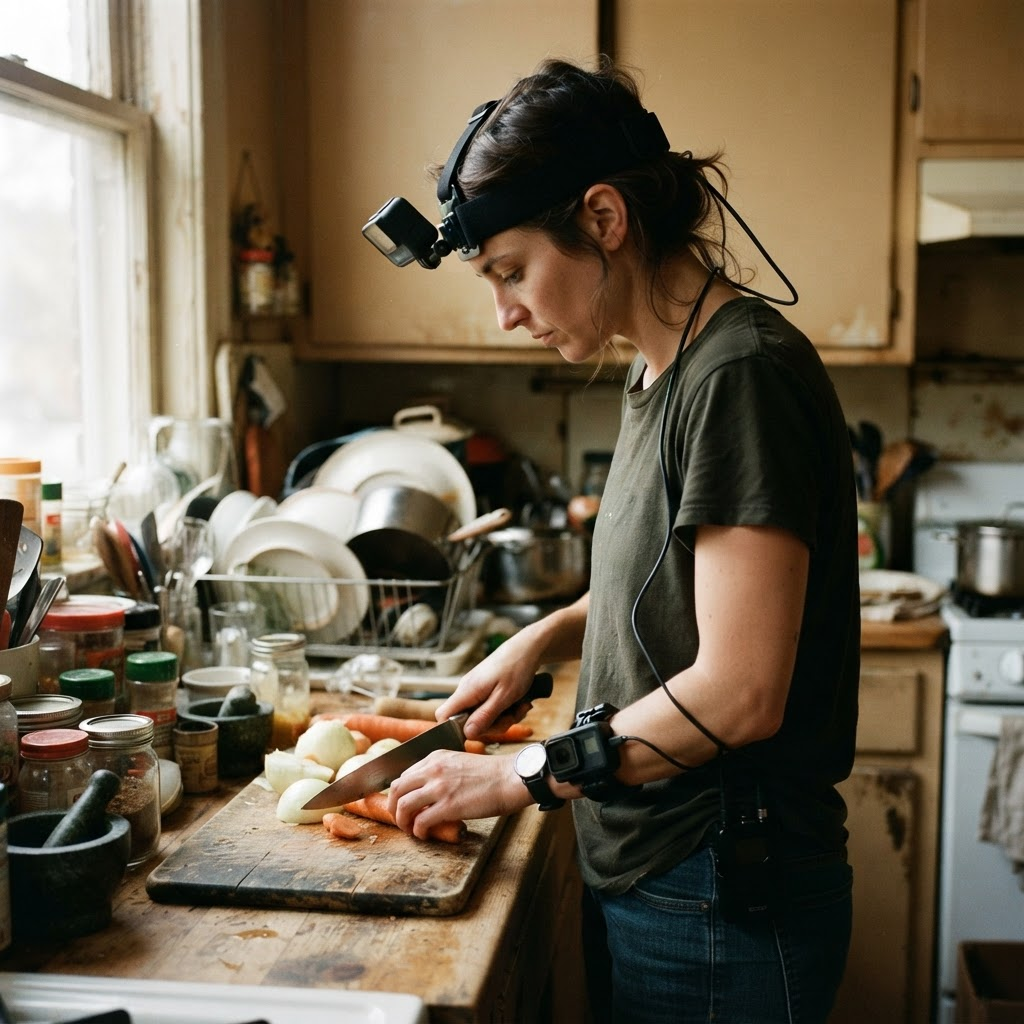
Wrist camera data collection means recording a task through cameras worn at the wrists, so the footage travels with each hand instead of staying fixed on the head or in the environment. On this site the wrist views are two cameras, left and right, captured alongside a head-mounted camera on the instrumented rig and delivered as the streams wrist_l and wrist_r.
This is the buying page for that data. The head-vs-wrist comparison explains what each viewpoint is for, the glossary defines the term, the multiview and head-mounted pages cover the wider rig, and the calibration guide covers the procedure. This page is for a team that already knows it needs wrist-view demonstrations and wants to specify, QA and buy them; the table below shows how the pages divide the topic.
One scope note matters for specifying: wrist views come from the instrumented rig tier. The lighter contributor-worn dual-lens 360 head-strap tier gives up depth, wrist views and sub-millisecond sync, and episode metadata labels which tier a clip came from.
Why it matters
A head-mounted camera gives the wide egocentric view: the environment, the target object and the approach. As a hand closes in on an object, though, the hand and arm frequently block the head camera’s view of the exact contact point. A wrist camera moves with the hand, so it stays close to the object through the final phase of a reach and grasp.
The wrist view also stays near the object during fine manipulation even when the head turns away. The trade-off is that it only covers what is near the hand and loses scene context. That is why the site pairs the two views, and why most manipulation policies need both.
If your robot carries a wrist camera, its observation includes a wrist-frame image, and demonstrations that carry a wrist-frame view in the same episode give that input a counterpart in the training data. That is a reasoning step, not a result: this site does not publish benchmark numbers, and neither does this page. Two wrist cameras are captured, one per hand, because most manipulation involves both.
Capture setup
The instrumented rig carries a head-mounted global-shutter camera, two wrist cameras, a forehead-mounted depth sensor and inertial measurement units on the head and on each wrist. Each wrist camera is worn on a velcro cuff with a rigid mounting plate. The rig is triggered from a PTP grandmaster clock and hardware trigger line in a belt pack, so every sensor runs off the same timebase.
The site states the global shutter for the head camera only; this page makes no shutter claim for the wrist cameras, and the only wrist-camera numbers here are the ones the episode schema itself shows, in the stream table below.
Depth comes from the forehead-mounted sensor; the multiview page describes a head-mounted stereo pair where precision requirements are high, with no baseline figure stated or claimed here. Inertial data is recorded at the head and each wrist as imu_head, imu_wrist_l and imu_wrist_r.
Capture runs through the same pipeline as every program: recruiting, capture against your written spec, per-batch QA, anonymization and licensed delivery. This page does not describe capture at a customer’s own facility.
Calibration and sync
Every sensor on the instrumented rig, wrist cameras included, is hardware-triggered off a single PTP clock domain, and each stream carries int64 nanosecond timestamps in that domain, so sync can be verified rather than taken on trust. The reject ceiling is 2.0 ms of residual sync error; delivered episodes measure a median of 1.12 ms and a p99 of 1.94 ms.
Every session is calibrated twice, before capture and after it ends. The solve uses a checkerboard target across 40 poses spanning every camera’s frustum, solves per-camera intrinsics to a reprojection error under 0.28 pixels, and solves the head↔wrist↔depth extrinsics against the shared target in the head-camera frame. The drift between the two solves is written into the episode metadata.
An episode is accepted only if RMS reprojection stays under 0.28 px and the drift is within tolerance; otherwise it goes to the reject log. A wrist frame is therefore related to the head frame in geometry as well as in time. The step-by-step procedure is in the calibration guide linked below.
Labels and streams
The episode schema groups the data into streams, annotations and calibration. The table below maps the wrist-relevant fields to what each captures and where it sits in the delivery formats.
Each label answers a different question next to the wrist view. action_segments says what the performer was doing, as a start and end timestamp with a verb and noun. hand_joints gives where the hands are: two hands, 21 joints each, per frame, in metres in the head-camera frame. hand_visible says which joints were actually observed, so occluded joints are flagged instead of guessed. contact_events marks when fingers make and break contact with an object; it is listed as optional on the hand tracking page, so name it in the written spec if you want it.
Because hand joints are expressed in the head-camera frame, the same frame the extrinsics use, the wrist-camera transform and the hand pose can be related without a separate alignment step. The meta group carries episode_id and skill_id, so wrist-view episodes tie back to the named skill in the spec.
Matching your robot
The site states what the rig captures: a left and a right wrist-mounted view, calibrated to the head camera. It does not state that the rig can reproduce a particular robot’s wrist-camera model, lens, mount position or field of view, and this page makes no such claim.
What the data does give a wrist-camera policy is the same kind of observation: a close, hand-frame view of the grasp, with the head view, depth and labels from the same moment. If a property of your robot’s camera matters, write it into the spec; the written spec and its accept criteria are where that is settled before capture begins.
QA
Acceptance is measured against accept criteria written into the spec before capture begins. Episodes are machine-checked against reject criteria: a sync breach beyond the ceiling for more than three consecutive frames, calibration drift beyond tolerance, the manipulated object out of frame for more than 15 percent of the episode, more than 35 percent invalid depth pixels in the manipulation region, an undocumented bystander, or a mismatch against the named skill spec. The site does not tie these checks to the wrist cameras specifically, and neither does this page.
A human reviewer then checks each episode against the task spec. A reject log ships with every batch, rejected episodes are recaptured at the provider’s cost, and you are billed per validated hour. A Spec Pilot, a small and fast first batch, lets you check the wrist footage, labels and QA bar on real episodes before you scale.
Consent and rights
Every contributor and operator signs a documented consent release, and each episode links to that release through a documented consent chain. Faces, license plates and screens that appear in frame are detected and irreversibly blurred at ingest, and a human reviewer confirms the result before anything ships. The anonymization record is included with delivery.
Every custom collection ships under a perpetual, buyer-owned commercial license. Exclusivity is available so the data is never resold to another buyer. The site does not make certification claims for this data, and this page makes none.
Delivery
Delivery formats are RLDS, LeRobot and WebDataset, plus HDF5, zarr and Rerun .rrd for full-fidelity review. The episode schema is the canonical layout and every format is a projection of it, so the wrist streams are part of what your loader reads.
Where the site names the wrist fields: in the LeRobot v2.1 layout the features are observation.images.head and observation.images.wrist_l/r, one mp4 per camera, with per-frame timestamps aligned to the head-camera clock. In WebDataset each sample carries __key__, head.jpg, wrist_l.jpg, wrist_r.jpg, depth.png and ann.json. In the episode schema the wrist views are streams/wrist_l/r. Delivery uses metric units: depth in millimetres and hand joints in metres.
Fast · on demand
Describe the skill, the objects and the settings your policy needs wrist views for, and which labels are in scope. We turn that into a written spec covering tasks, environments, capture tier (the instrumented rig, since that is where wrist views come from), annotation depth and accept criteria, then quote reach, timeline and price against it before capture begins. Pricing details are on the pricing page.
Where coverage is deep, the first validated batch lands in a median of 48 hours from signed spec. Thin environments typically take three to four weeks, and we quote that timeline up front. On-demand top-ups run against the same spec and accept criteria, so new wrist-view data stays consistent with what you already hold.
At a glance
Every collection runs through the same seven-stage end-to-end custom collection pipeline. End-to-end custom data collection is a managed service that takes an AI data need from problem to owned dataset in a single accountable pipeline.
Streams and labels
| Stream or label | What it captures | Format field |
|---|---|---|
| wrist_l, wrist_r | Left and right wrist-camera video; the episode schema shows uint8 frames of [T, 1080, 1920, 3] at 60 Hz | streams/ group; LeRobot observation.images.wrist_l/r; WebDataset wrist_l.jpg, wrist_r.jpg |
| head_rgb | The head-camera view of the same episode: the scene and the approach | streams/ group; LeRobot observation.images.head; WebDataset head.jpg |
| imu_wrist_l, imu_wrist_r, imu_head | Wrist and head motion and orientation; the schema shows float32 [N, 6] at 200 Hz | streams/ group |
| depth_mm, depth_conf | Per-pixel metric depth in millimetres, with a confidence stream | streams/ group; WebDataset depth.png |
| *_timestamp_ns | Per-stream int64 nanosecond timestamps in the PTP domain | streams/ group |
| action_segments | Start and end timestamps with a verb and noun for each sub-action | annotations/ group |
| hand_joints, hand_visible | Two hands, 21 joints each, per frame, in metres in the head-camera frame, with a per-joint visibility flag | annotations/ group; hand_joints in ann.json in WebDataset |
| contact_events | When fingers make and break contact with an object; optional, named in the spec | annotations/ group; ann.json in WebDataset |
| intrinsics, extrinsics, rms_reproj_px | Per-camera intrinsics, transforms between camera frames, and the reprojection error | calibration/ group |
Calibration and sync
| Check | What the site states | Where it sits |
|---|---|---|
| Hardware trigger | Head, both wrist cameras, depth and IMU triggered off one PTP grandmaster clock | *_timestamp_ns per stream |
| Sync ceiling | Residual sync error above 2.0 ms is rejected; delivered episodes measure a median of 1.12 ms and a p99 of 1.94 ms | Reject log |
| Intrinsics | Solved per camera to a reprojection error under 0.28 px | calibration/ group; rms_reproj_px |
| Extrinsics | Head↔wrist↔depth solved against a shared target, in the head-camera frame | calibration/ group; extrinsics (SE3) |
| Solves per session | One before capture and one after; drift written into episode metadata | Episode metadata |
| Acceptance gate | Accepted only if RMS reprojection stays under 0.28 px and drift is within tolerance | Reject log if it fails |
Related pages
| Page | Focus | What you get |
|---|---|---|
| Wrist camera data collection (this page) | Buying wrist-view data: wrist streams with the head view, labels, QA, licence, delivery | A custom dataset to your spec with wrist_l/r streams, calibration and labels |
| Head-mounted camera data collection (/custom-collection/head-mounted-camera-data-collection) | The head side of the rig, capture tiers, calibration and QA | A custom head-camera dataset |
| Multiview video data collection (/custom-collection/multiview-video-data-collection) | The whole synchronized multi-camera system | A custom multi-camera dataset with views related in time and in 3D |
| Head cameras vs wrist cameras (/compare/head-vs-wrist-cameras) | What each viewpoint is for | A comparison, not a dataset |
| Wrist camera glossary (/glossary/wrist-camera) | A definition of the term | A definition and FAQ, not a dataset |
| Calibrating head and wrist cameras (/guides/calibrating-head-and-wrist-cameras) | The calibration procedure | A how-to guide, not a dataset |
FAQ
Sources
Tell us the skill, objects and settings your policy needs wrist views for. We will quote reach, timeline and price against a written spec, with a first validated batch in a median of 48 hours where coverage is deep.